Overview
jDeploy 5.1 introduces two major features that significantly improve the deployment and maintenance experience for Java desktop applications. Platform-specific bundle support allows developers to create optimized distributions that exclude unnecessary platform-specific files, dramatically reducing download sizes. Additionally, automatic version cleanup ensures that user systems remain clean by removing outdated application versions during updates.
What’s New in 5.1
Platform-Specific Bundles
jDeploy 5.1 introduces a powerful new feature that allows you to create optimized bundles for each target platform by excluding unnecessary platform-specific files. This is particularly valuable for applications that include platform-specific native libraries or resources.
The Problem It Solves
Modern Java applications, especially those using frameworks like Compose Multiplatform or including native libraries, often bundle platform-specific files for all supported platforms in a single distribution. This results in:
-
Unnecessarily large downloads - Users download files for platforms they’ll never use
-
Increased bandwidth costs - Both for developers hosting downloads and users downloading them
-
Slower installation times - Larger bundles take longer to download and extract
Real-World Impact
The impact can be dramatic. For example:
-
Compose Multiplatform apps: The People in Space demo drops from 100 MB to 40 MB per platform
-
jDeploy installer itself: Reduced from ~35 MB to ~4 MB using this feature
-
Applications with native libraries: Can see 50-70% size reductions per platform
How It Works
Platform-specific bundles allow you to define which files should be included or excluded for each platform using a familiar .gitignore-style syntax. You can:
-
Exclude entire packages - Remove Windows-specific code from Mac bundles
-
Use wildcards - Match patterns like
.dllor-win64.so -
Override with keep patterns - Exclude a package but keep specific sub-packages
-
Apply global rules - Set exclusions that apply to all platforms
Configuration Methods
Platform-specific bundles can be configured through multiple approaches:
- GUI Configuration
-
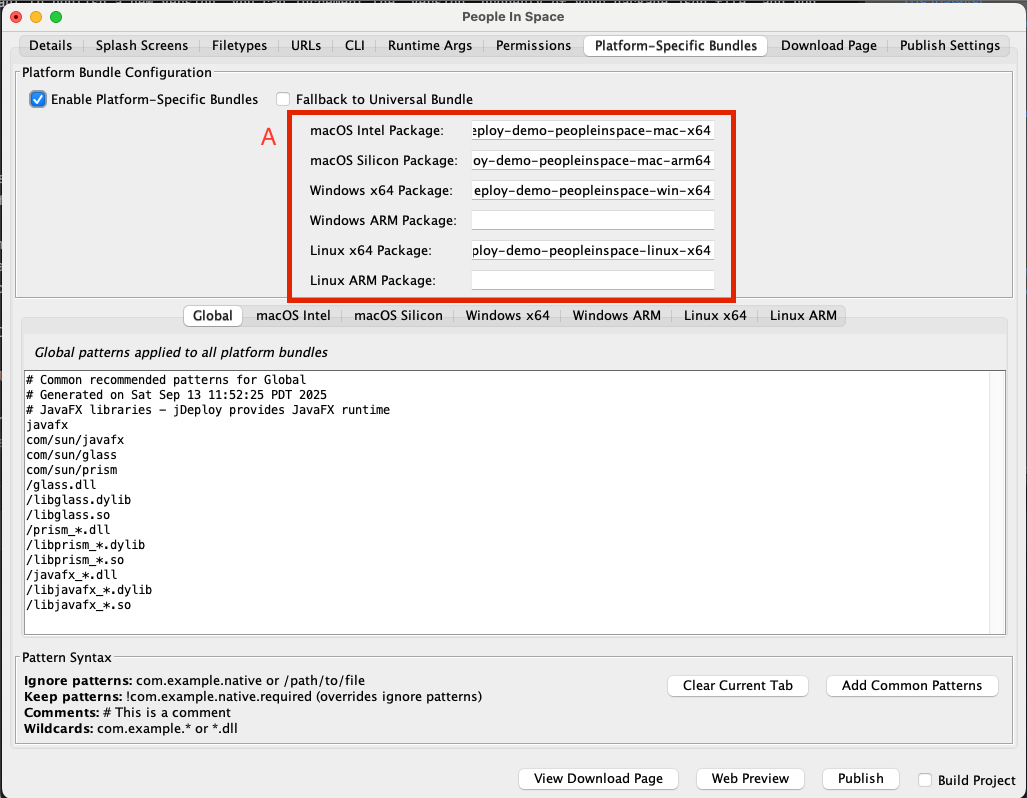
The new "Platform-Specific Bundles" tab in the project editor provides an intuitive interface with sub-tabs for each platform.
- Configuration Files
-
.jdpignorefiles use the same syntax as.gitignore:-
.jdpignore- Global patterns for all platforms -
.jdpignore.mac-x64- Mac Intel specific patterns -
.jdpignore.mac-arm64- Mac Apple Silicon specific patterns -
.jdpignore.win-x64- Windows x64 specific patterns -
.jdpignore.win-arm64- Windows ARM64 specific patterns -
.jdpignore.linux-x64- Linux x64 specific patterns -
.jdpignore.linux-arm64- Linux ARM64 specific patterns
-
- Package.json Configuration
-
Enable and configure platform-specific bundles in your
package.json:
{
  "platformBundlesEnabled": true,
  "fallbackToUniversal": false,
  "packageMacX64": "my-app-macos-intel",
  "packageMacArm64": "my-app-macos-silicon",
  "packageWinX64": "my-app-windows-x64",
  "packageWinArm64": "my-app-windows-arm64",
  "packageLinuxX64": "my-app-linux-x64",
  "packageLinuxArm64": "my-app-linux-arm64"
}
Pattern Examples
Here are some common patterns you might use:
Exclude Windows DLLs from Mac/Linux bundles:
# In .jdpignore.mac-x64, .jdpignore.mac-arm64, .jdpignore.linux-*
*.dll
/native/windows
com.myapp.windows
Exclude all native libraries except for current platform:
# In .jdpignore.mac-arm64
/native/*
!/native/macos-arm64
Remove platform-specific JNI libraries:
# In .jdpignore.win-x64
*-darwin.dylib
*-linux.so
*-arm64.dll
Automatic Version Cleanup (5.1.1)
Starting with jDeploy 5.1.1, the installer now automatically removes old application versions when installing updates. This addresses a long-standing issue where multiple versions could accumulate on user systems, consuming unnecessary disk space.
Why This Matters
Previously, each application update would install alongside existing versions, leading to:
-
Disk space issues - Multiple versions consuming gigabytes of space
-
User confusion - Uncertainty about which version to use
-
System clutter - Accumulated files in application directories
How It Works
The automatic cleanup process:
-
During Updates: When installing a new version, the installer identifies and removes previous versions
-
Preserves User Data: Only application bundles are removed; user preferences and data remain intact
-
Clean Uninstall: Ensures proper cleanup through the system’s uninstall mechanisms
Configuration
This feature is enabled by default in 5.1.1. If you need to preserve old versions for specific use cases, you can disable it:
{
  "jdeploy": {
    "pruneOldVersions": false
  }
}|
Note
|
Before 5.1.1, old versions were never deleted. Starting with 5.1.1, the default behavior is to delete old versions (pruneOldVersions: true).
|
Technical Improvements
Bundle Generation Efficiency
The platform-specific bundle system introduces several technical improvements:
-
Parallel bundle generation - Different platform bundles can be built simultaneously
-
Incremental filtering - Only changed patterns trigger bundle regeneration
-
Smart caching - Common files are cached between platform builds
NPM Publishing Strategy
When using platform-specific bundles with npm:
-
Separate packages per platform - Each platform publishes to its own npm package
-
Automatic fallback mechanism - Can fall back to universal bundle if platform-specific isn’t available
-
Version synchronization - All platform packages maintain version parity
File System Management
The version cleanup feature implements:
-
Safe deletion - Verifies file ownership before removal
-
Atomic operations - Either completes fully or rolls back
-
Cross-platform compatibility - Works correctly on Windows, macOS, and Linux
Migration Guide
Upgrading from 5.0
jDeploy 5.1 is fully backward compatible with 5.0. Existing applications continue to work without any changes. To take advantage of new features:
Enabling Platform-Specific Bundles
-
Open your project in the jDeploy GUI
-
Navigate to the "Platform-Specific Bundles" tab
-
Enable platform-specific bundles by checking the checkbox
-
Configure NPM package names for each platform (if using npm)
-
Add exclusion patterns for each platform
-
Test locally using
jdeploy package -
Publish your optimized bundles
Configuring Version Cleanup
For applications updated to 5.1.1, automatic cleanup is enabled by default. No action is required unless you want to disable it:
{
  "jdeploy": {
    "pruneOldVersions": false  // Only add this if you want to keep old versions
  }
}
Best Practices
Platform-Specific Bundle Patterns
- Start with aggressive exclusions
-
Begin by excluding everything platform-specific, then add back what’s needed:
# Exclude all native libraries
/native/*
# Keep only what this platform needs
!/native/current-platform/- Use package notation for Java packages
# Good - excludes the entire package
com.myapp.platform.windows

# Also good - using path notation
/com/myapp/platform/windows/- Comment your patterns
# Windows-specific UI components (not needed on Mac)
com.myapp.ui.windows

# DirectX native libraries
*.dx11.dll
*.dx12.dll
Testing Platform-Specific Bundles
-
Build all platform bundles locally using
jdeploy package -
Compare bundle sizes to verify exclusions are working
-
Test installation on each target platform
-
Verify functionality isn’t affected by exclusions
Resources and Support
-
Official Website: https://www.jdeploy.com/
-
Download jDeploy: https://github.com/shannah/jdeploy-desktop-gui/releases/latest
-
Documentation: https://www.jdeploy.com/docs/manual/
-
Platform-Specific Bundles Guide: https://www.jdeploy.com/docs/manual/#platform-specific-bundles
-
GitHub Repository: https://github.com/shannah/jdeploy
-
Community Support: GitHub Issues and Discussions